 Capital
Brokers
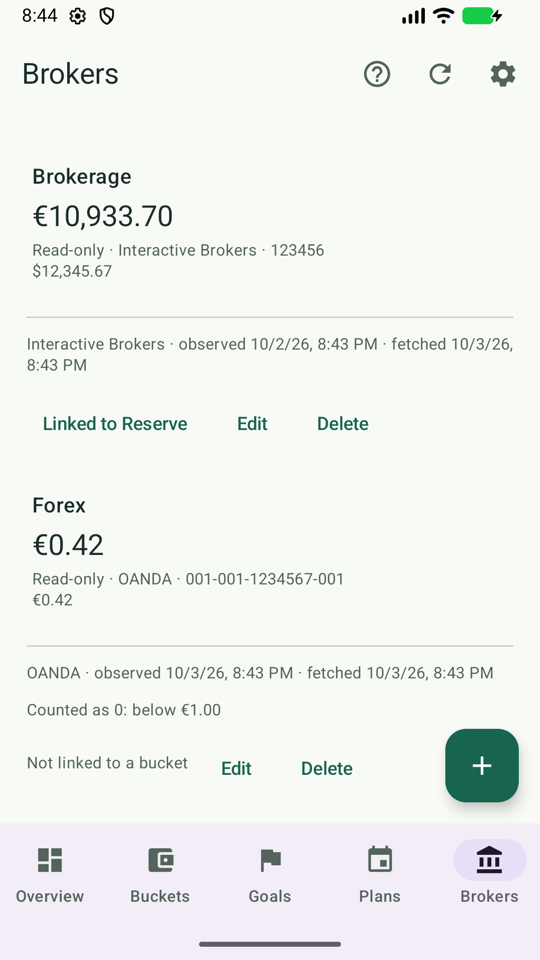
What it is. Your read-only connections to brokerage and forex accounts. A broker account is the broker, the account or query id, and the broker’s credential; on refresh the app reads the account’s total value in its base currency. Accounts live on this screen, not inside buckets: a bucket only links to one, and buckets remain the place where your savings are counted.
What each row shows. The account’s name, the broker and the id, the last value read in the account’s currency and in your default currency, when it was observed and when it was fetched, and the bucket it is linked to: Linked to … opens that bucket, Not linked to a bucket means nothing counts it yet. Edit changes the name, the broker or the id; Delete removes the account and, when it was linked, the holding that linked it.
Adding an account. Press +, enter a name, pick the broker and enter the id that broker uses: the Flex Query id for Interactive Brokers, the account id for OANDA, the account number for Trading 212. For SnapTrade press Connect a brokerage through SnapTrade, come back, press Fetch accounts and choose one. Save. The currency and the value appear after the next refresh.
Ignore balances less than. Tick it and enter an amount in your default currency (1 by default) to keep dust out of your savings: when the account’s value, converted with the cached rates, is below that amount, the linked holding counts as 0 and the row says Counted as 0: below …. The real value stays visible on this screen. Without a rate for the account’s currency nothing is ignored.
Linking it into a bucket. Open the bucket, press Add holding, set Tracking to Broker account and choose the account; leave the name blank to use the account’s name. One account can be in one bucket at a time. Edit / move on the holding moves it to another bucket; deleting the holding unlinks the account without deleting it.
Credentials. The token or key of each supported broker; one set per broker covers every account of that broker. They are encrypted with a key held in Android Keystore, never written into the data folder, left out of exports and system backups, and sent only to the broker that issued them. Setup guide for broker accounts opens Broker and forex accounts, which lists the steps for each broker.
Refresh. The refresh icon on this screen reads every account; the refresh on a bucket reads only the accounts linked into that bucket. An account that cannot be read keeps its last value and shows the broker’s message under its row. The app only reads: it never places orders or moves money.