 Capital
Overview
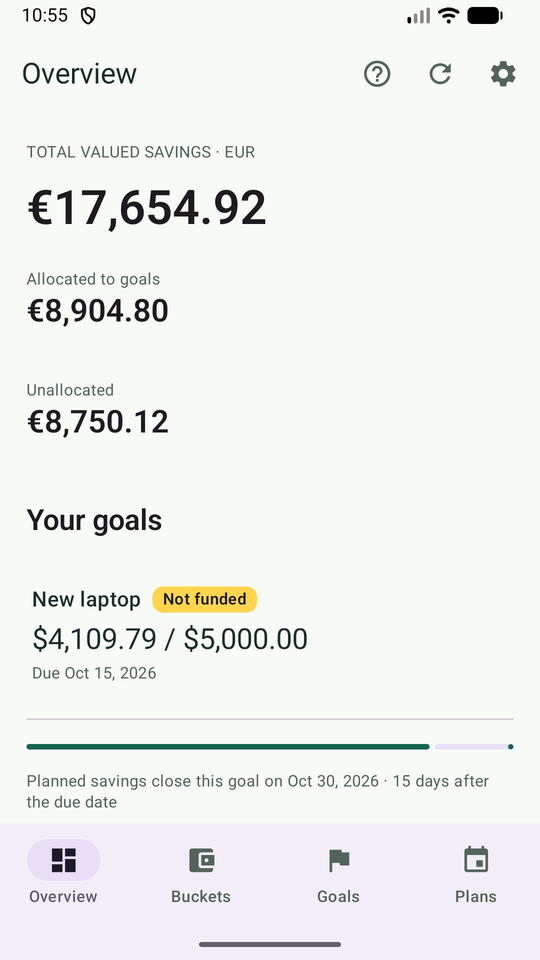
What it is. The home tab. One number for everything you own, how much of it is spoken for by goals, and the state of each goal.
What it shows.
- Total valued savings in your default currency: every holding in every bucket, converted with the latest quotes. If a quote is missing, the total is marked incomplete and the native quantities are still visible on the Buckets tab.
- Allocated to goals: the part of that total that the goals can claim through their connections.
- Unallocated: what no goal claims. Money can be unallocated because no goal is connected to that bucket, because a limit caps the connection, or because every connected goal is already funded.
- Your goals: the same cards as on the Goals tab, in funding order, with the badge and the projection line.
How the numbers relate. Total = allocated + unallocated, always. Allocation never moves money: it only says which goal a bucket would cover today.
Top bar. The refresh icon reloads every wallet balance and price and spins while it works. The gear opens Settings. ? opens this page.
Notices. A yellow bar appears when the folder has unsaved changes or when two revisions of the folder conflict; stale or missing quotes are reported on the Settings screen. Each notice has its own buttons; see Sync, backup, recovery.