 Capital
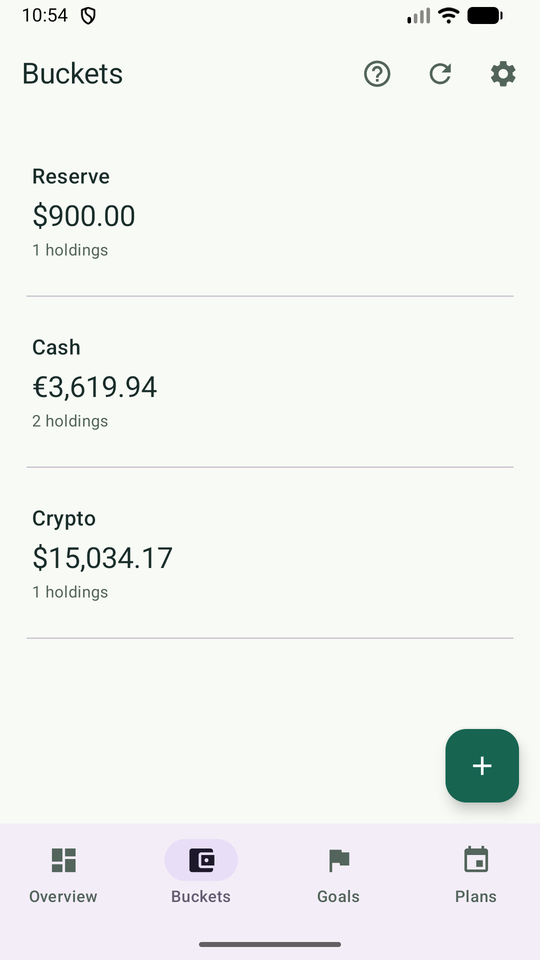
Buckets
What it is. The list of places where you keep money. A bucket can be a bank account, a cash stash, a brokerage account, an exchange account or a crypto wallet.
What each card shows. The bucket name, its value in the bucket’s own currency, and the number of holdings in it. Tap a card to open the bucket.
Adding a bucket. Press + at the bottom right. A bucket needs a name and a currency: ISO codes such as EUR or USD, or a native asset such as BTC. The currency only sets how the bucket’s total is displayed; holdings inside it can be in any currency.
Portfolio mode. The same editor has a Portfolio mode switch. A portfolio bucket shows each asset’s real share against a target share you set and offers a rebalance calculator. See Portfolio mode.
Order. Buckets are listed in the order they were created. The order has no effect on allocation.
Refresh. The top-bar refresh reloads every bucket. A single bucket can be refreshed from its own screen.