 Capital
Goals
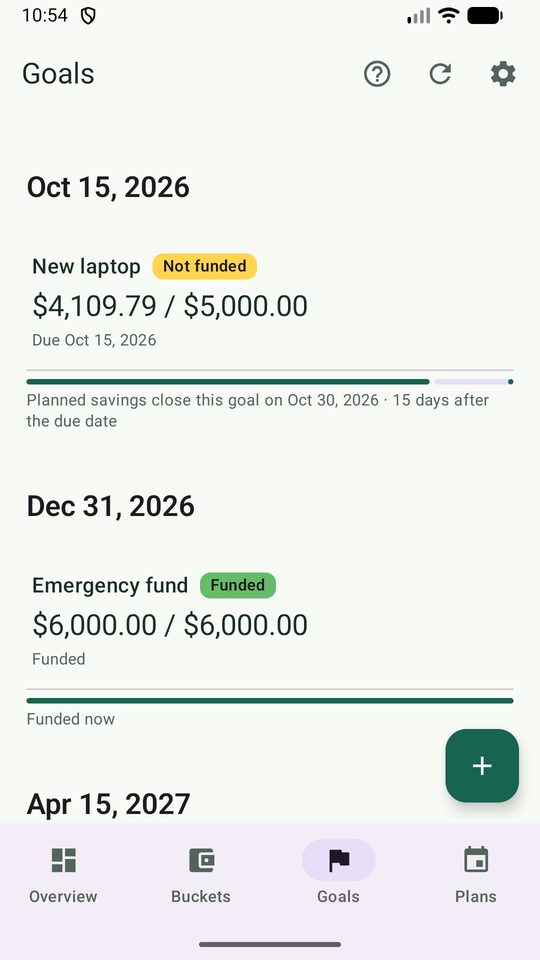
What it is. Everything you are saving for, grouped by due date, in the order the money is assigned.
What each card shows.
- The name and a badge: Funded (green) when today’s savings cover the target, Funded in time (green) when planned savings close the goal by its due date, Not funded (yellow) otherwise.
- Funded / target in the goal’s currency, and the due date.
- A progress bar. The solid part is funded today; the light part is what plans add later.
- A line under the bar: Funded now, or the date on which planned savings close the goal, or how much is still short and by when.
- For a FIRE goal the line reads *FIRE on
· age N*, or *not reachable*; see [FIRE](/screens/goal#fire).
Order and priority. Goals with an earlier due date are funded first. Goals that share a date are funded in the order shown; drag the ≡ handle to change it. Archived goals sit at the bottom and take nothing.
Adding a goal. Press +. A goal has a name, a currency, a target amount and a due date. Goal type is Savings goal or FIRE; a FIRE goal takes a FIRE date, a contribution and a spend instead, see FIRE. The goal does not receive money until you open it and connect at least one bucket; see Goal.
How allocation works. Buckets are shared between the goals they connect to, within the limits set on each connection, earlier goals first. When a bucket is connected to several goals, the app moves money between them so that no goal is left short while another is over-funded. Planned savings are applied only after every real bucket, so they never replace money you already have.