 Capital
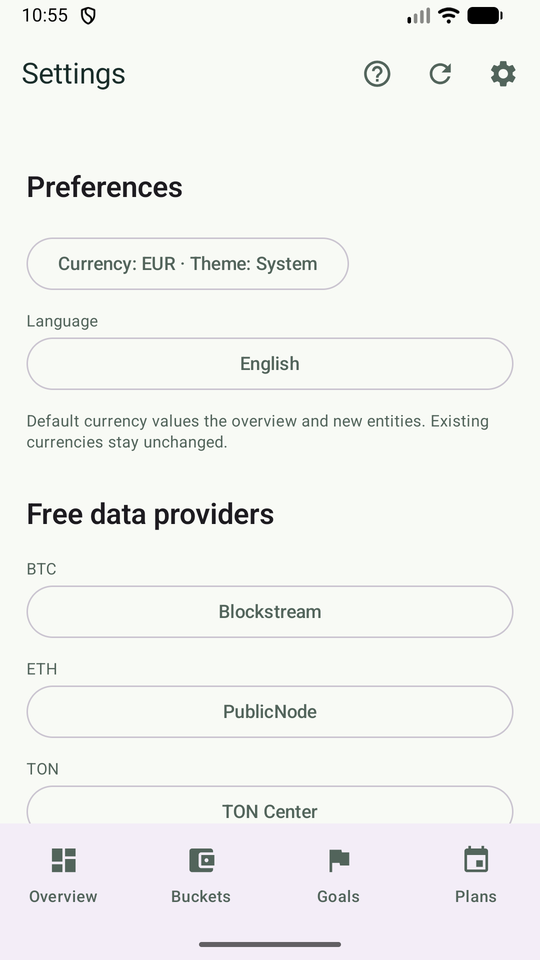
Settings
What it is. Everything that is not a record: preferences, data sources, security and the folder. Opened with the gear in the top bar; on wide screens it is a tab in the rail.
Notice. A yellow bar at the top says when cached values are stale (refresh when online) or when a valuation is incomplete because a balance or rate is missing. It appears only here.
Preferences. Default currency and theme (system, light, dark). The default currency values the Overview and is proposed for new buckets and goals; existing records keep their currency. Language switches the interface immediately; System default follows the device.
Free data providers. One row per data type, each with the operator in use: BTC, ETH, TON, TRX balances; ETH, TON, TRX token lists; crypto prices; fiat rates; Inflation (World Bank, ECB, OECD, Off) and Market growth (World Bank, Yahoo Finance · unofficial, Off), which feed FIRE goals and keep the built-in defaults when Off; Rate history (Frankfurter + DefiLlama, Off) fills the daily rate history of every asset you hold, back to the oldest date in your records, so past values can be computed. Tap a row to pick another operator, switch token lookups Off for a chain, or enter an optional API key. Keys are stored encrypted on the device and sent only to the operator that issued them. Test sources / refresh portfolio queries every operator with the assets you actually hold and reports what failed. No operator is ever substituted silently.
Brokers. Broker accounts and their credentials have their own screen: Brokers.
Auto update rates. Off, Every 24 h, 12 h, 6 h, 3 h or 1 h. When on, a background job fetches the current rate of every asset you hold at that interval, with the operators chosen above, and keeps the samples in the rate history. It never touches the data folder: the next time you open the app or refresh, the samples are merged into the cached quotes, so totals start from the newest rates even offline. It needs a network connection and uses a little battery and data. The last run is shown under Quotes and freshness as Last background update.
Quotes and freshness. Every cached quote, and every fetched inflation and growth series, with the source and the time it was observed and fetched. Stale quotes stay usable and are flagged by the notice at the top of this screen.
Security. Encryption encrypts every file in the folder with a password; switching it off decrypts them. With encryption on you can Set PIN, enable Use biometrics, choose Lock after time in background and Change password. There is no password recovery. Ten wrong PINs remove the PIN; the password always works. See Security.
Storage. The current folder and its revision. Reconnect / open folder re-runs the folder picker; Reload local files re-reads the folder, for example after your sync tool delivered changes; Export backup writes one portable file (plaintext when encryption is off, marked as such); Restore backup validates a file before replacing the records and keeps the existing snapshots.
Sources / attribution. Links to the site of every operator.
Legal. Links to the Privacy Policy, the Data safety and the Financial features declarations on this site, in the interface language. The app version and build number are at the bottom.