 Capital
Plans
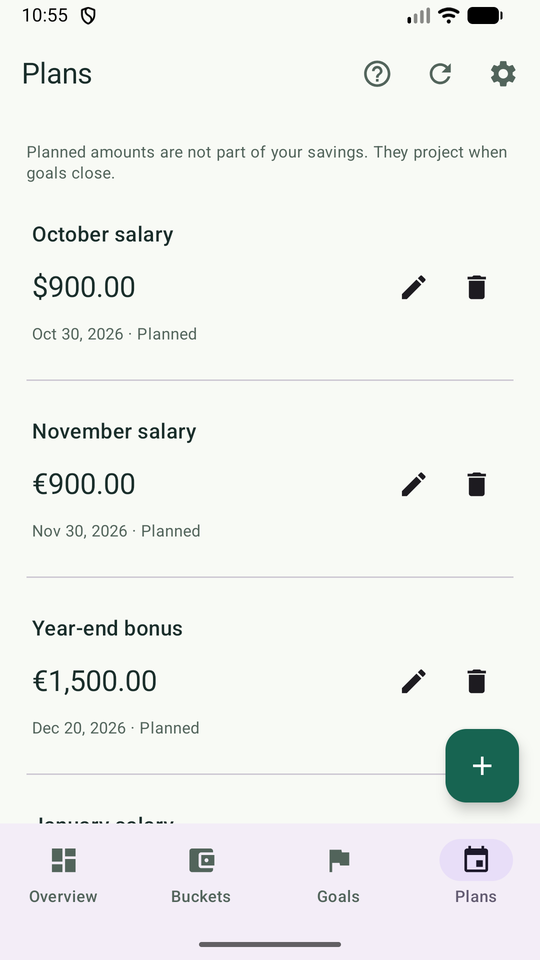
What it is. The savings you intend to make: salary at the end of each month, a bonus in December, a tax refund. Plans are not part of your savings and do not change any total. They only extend the projection on the goals.
What each row shows. The plan’s name, its amount and currency, the date, and Planned or Archived. The pencil edits, the bin deletes.
Adding a plan. Press + and enter a name, a currency, an amount and a date. Dates are entered as YYYY-MM-DD or picked from the calendar.
How plans are applied. Plans are sorted by date and added up. After each one the app recomputes the allocation with the extra money, applied after every real bucket, to the goals in due-date order. The first date on which a goal’s need is covered becomes its closing date, shown on the goal as Funded in time or, if it is later than the due date, as Not funded with the number of days late.
Archived plans. When a plan’s date has passed it moves to the Archived section, greyed out, and is no longer counted. Either you already moved that money into a bucket and the app sees it there, or the plan did not happen. Edit its date into the future to make it active again, or delete it.
Currencies. A plan in another currency is converted with the cached rates. If the rate is missing, the projection is marked incomplete.