 Capital
Bucket
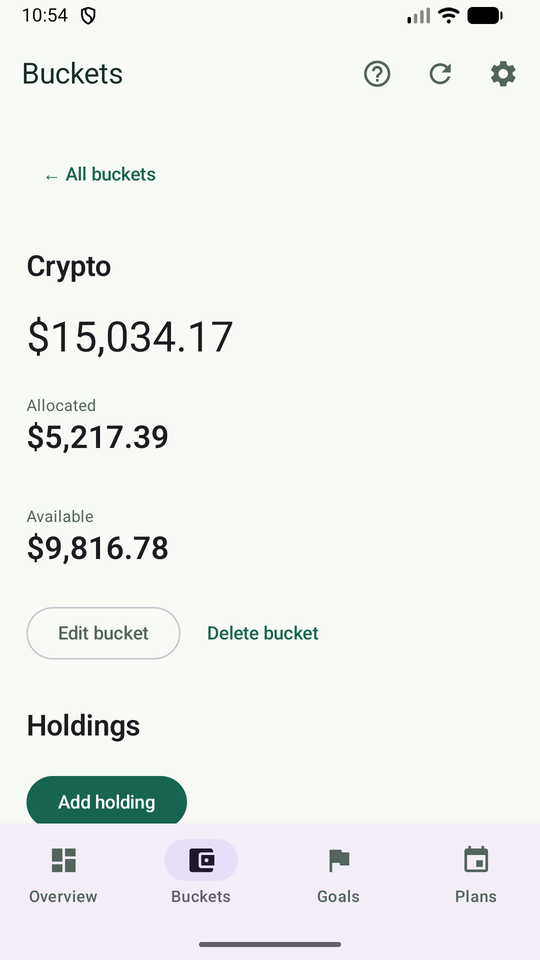
What it is. One bucket with its holdings. Reached by tapping a card on the Buckets tab; ← All buckets goes back.
Header. The bucket’s value, then two numbers that only make sense together: Allocated, the part claimed by connected goals, and Available, the rest. Edit bucket opens the name, currency and portfolio switches. Delete bucket removes the bucket and its holdings after a confirmation.
Holdings. Each holding shows its name, its value in the bucket currency, how it is tracked (Manual, Wallet or Broker account), the native quantity, when the value was observed and when it was last fetched. Edit / move changes it or moves it to another bucket; Delete removes it.
Add holding opens the holding editor:
- Manual: a name, a currency or asset code and the quantity. Use it for anything the app cannot read.
- Wallet: pick the chain (BTC, ETH, TON, TRX) and paste one public address. The app reads the native balance on refresh and, on ETH, TON and TRX, the fungible tokens on that address. Open the editor again and press Fetch tokens to see them and switch off the ones you do not want counted.
- Broker account: choose one of the accounts added on the Brokers screen; leave the name blank to use the account’s name. On refresh the app reads the account’s total value in the account’s base currency. One account can be linked into one bucket; deleting the holding unlinks it without deleting the account.
Tokens and “not counted”. A token is identified by its contract address. It counts only when your price source lists that exact contract; otherwise it is listed as Unknown token · not counted and stays out of the totals. This is what keeps an airdropped fake “USDT” out of your savings.
Investment PnL. Switch it on in Edit bucket (checkbox Investment PnL). The app then records, at every refresh, the quantity of each holding and the deposits and withdrawals of its broker accounts, and the screen gains an Investment section:
- Five rows, All time, Last year, Last month, Last week and Last day, each with the profit or loss in the bucket currency and the time-weighted return in percent, green when positive and red when negative. A row shows *since
* instead when the history starts after that period began. - A Value chart of the bucket’s value and a Profit and loss chart of the cumulative result, both in the bucket currency. The chips All, 1Y, 1M, 1W and 1D focus both charts on that time frame; the PnL curve restarts at zero at the start of the frame.
- *Since
· in * says where the history begins. *Some days lack a rate; those values carry the last known one* appears when the rate history has gaps.
How it is computed. Profit or loss = value change minus deposits plus withdrawals. The percentage is time-weighted: each day’s return is chained, so the timing of your deposits does not change it. Deposits and withdrawals come from the broker for linked accounts (which brokers); for manual holdings and wallets a change of the quantity counts as a deposit or withdrawal at that day’s rate, never as profit. Past values use the daily rate history (Settings → Rate history). Turning the switch on builds the history from the snapshots already in your folder and from the brokers (Building the PnL history…, then PnL history ready: N days); until the first refresh the section says No history yet.
Portfolio mode. When it is on, the screen adds a table with value, real share, target and difference per asset, plus a Rebalance button that asks for an amount and lists what to buy. Sells appear only when Allow sells during rebalance is on. Nothing is traded.